August 4th, 2026
With this tiny release, we've introduced the following quality-of-life improvements:

The available classifications can now be further customised for all view types, allowing you to tailor the visualisation to your needs. The settings can be applied either to a single point cloud file or to all point cloud files within the project.

Based on user feedback, the manual stockpile calculation tool is now available across all Viewer packages!
Simply extract the base of the stockpile, choose the desired resolution, and optionally specify the material. The volume is calculated in just a few seconds. Fast, intuitive, and compatible with all point clouds.
Introduced the new SkyGIS Viewer and SkyGIS Pro logos across the website.
Custom Branding for SkyGIS Pro now supports custom domains, allowing organisations to access their portal through their own branded URL.
Added support for South Brand SLAM Scanner undistorted image packages.
Implemented multiple bug fixes and performance improvements.
As always, if you have an idea for a new feature or run into a bug, we'd love to hear from you. Your feedback helps us keep improving SkyGIS.
July 14th, 2026
This release brings a range of new features and enhancements across SkyGIS.

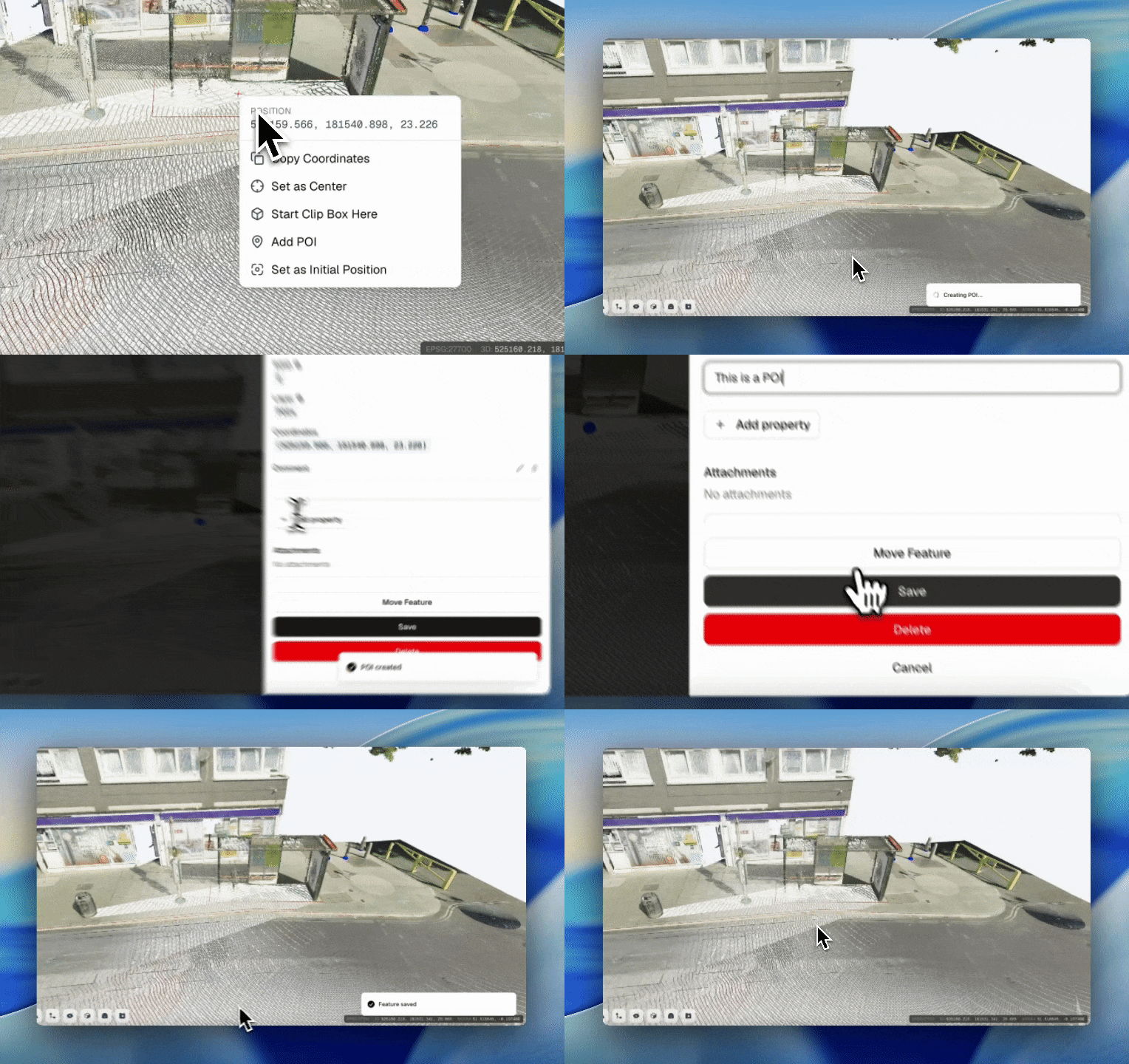
Adding Points of Interest is now effortless. Just right-click anywhere in the point cloud, select Add POI, and enter your comment - the POI appears instantly, with no need to create a separate vector layer first.

You asked, we listened. You can now save your current view directly from the Saved Views option in the Layer Panel, with support for both private and shared views. Each saved view retains camera settings, layer states, and clipping box parameters, so you can jump back to any important perspective in a single click.

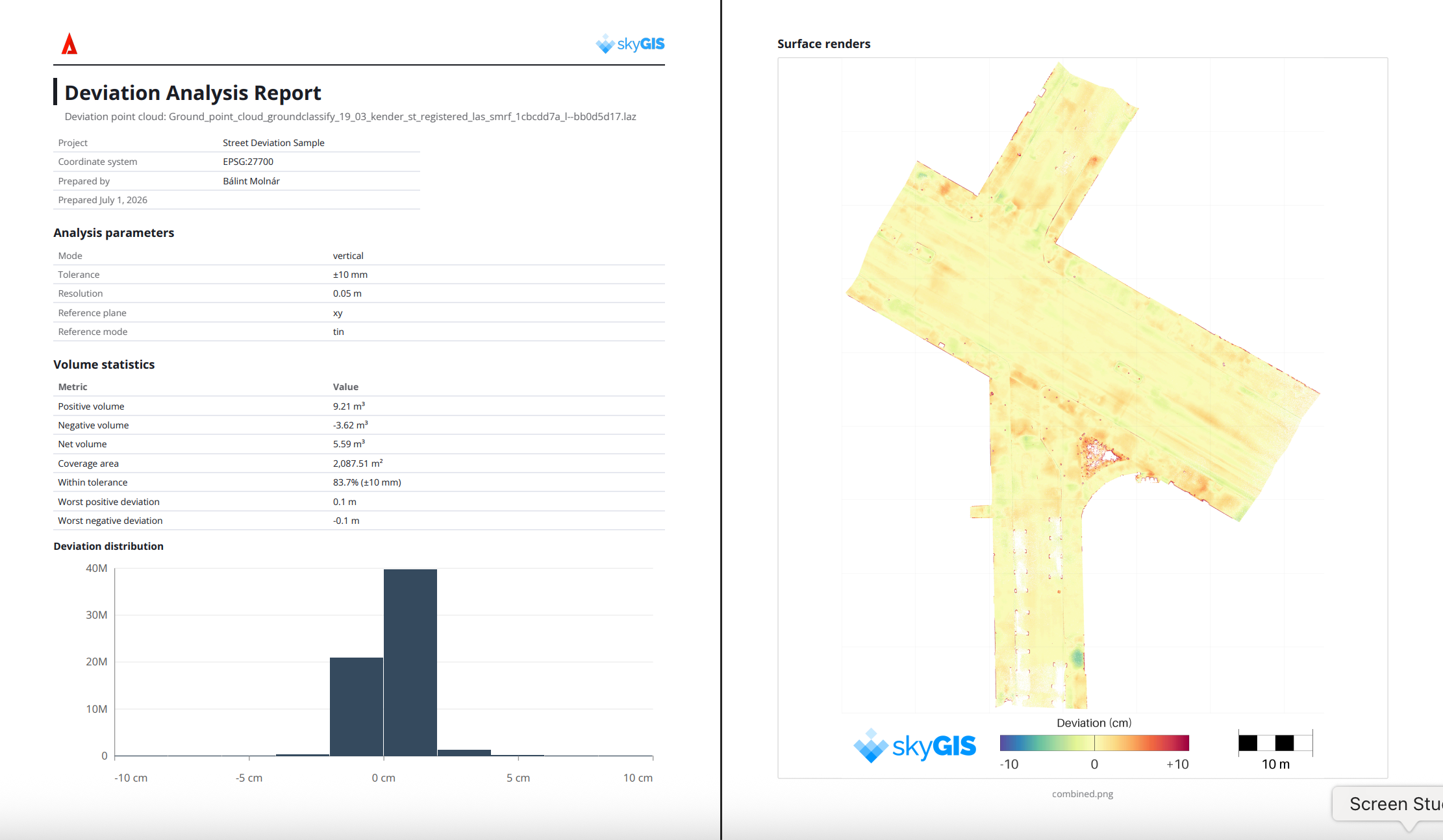
Deviation rasters and point clouds are now accompanied by a comprehensive PDF report. It captures key deviation metrics, calculated volumes, cut/fill values, and a visual rendering to help you orient yourself within the project area. The result is detailed, professional surface-to-cloud deviation documentation - clear records of your results and dependable volume calculations to support planning, validation, and decision-making on future construction and earthworks projects.

The Orthographic Camera now offers an optional grid overlay, toggled on in the settings. The grid adapts dynamically to your current view and scale, letting you quickly gauge distances and spatial relationships directly within the data. By providing a consistent visual reference across perspectives, it streamlines navigation, interpretation, and measurement.

The first release of our automatic license plate and face blurring tools is here, supporting privacy-protection workflows.

Snapping can now be enabled from the settings menu. It supports endpoints, center points, and edges for more precise measurements.

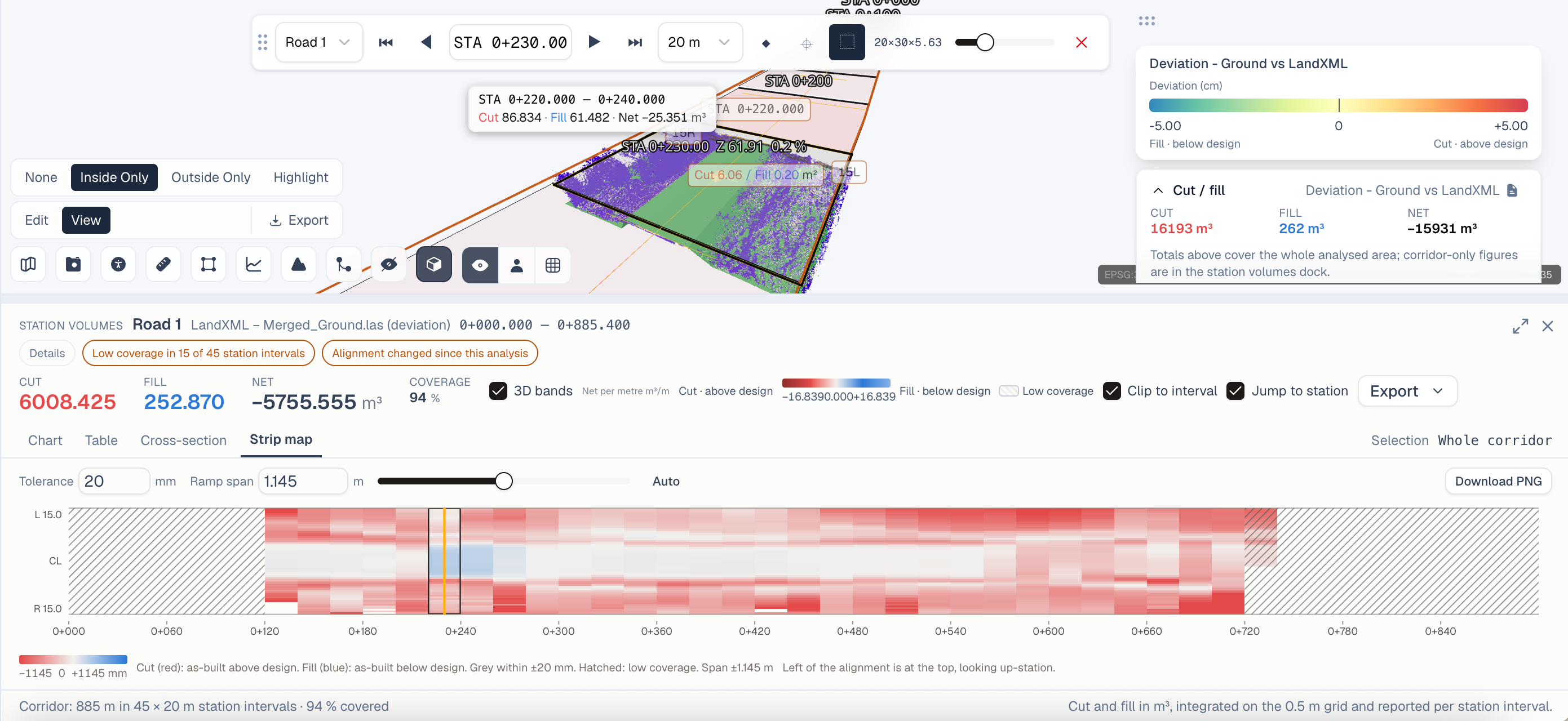
Deviation Analysis now works with LandXML surfaces, so you can run deviation analysis directly against LandXML-based terrain and design surfaces — giving you more flexibility when comparing surveyed data against project specifications.
Measurement Improvements — Delete all measurements at once, instead of removing them one by one.
Billing Manager Role — A new dedicated role for managing your organization's billing.
GeoPackage Support — Upload vector data in the GeoPackage (GPKG) format.
Google KML/KMZ Support — Import Google KML and KMZ files for use as vector layers in SkyGIS.
GeoTIFF Enhancements — Orthophoto generation from point clouds is now even smoother: an orthophoto can be created right after upload, removing extra processing steps and speeding up data preparation.
Batch Naming — Your company logo now appears in shared links, helping partners and clients connect your brand to the products and deliverables you share.
As always, if you have an idea for a new feature or run into a bug, we'd love to hear from you. Your feedback helps us keep improving SkyGIS.
March 16th, 2026
Finally, the time has come: SkyGIS is now in Public Beta.
We’ve poured a lot of care, iteration, and engineering effort into SkyGIS to make it genuinely useful from day one—not as a concept, but as a platform you can rely on in real workflows. SkyGIS is a cloud-native, browser-based GIS inspector and editor designed to unify the formats and tools professionals use every day, without the friction of desktop installs, plugins, or heavyweight local processing.
SkyGIS is a browser-based platform for viewing, inspecting, measuring, and collaborating on geospatial and 3D reality-capture data—all in one place.
It brings together point clouds, vector layers, imagery, and CAD/BIM models in a single cloud-native environment, so surveyors, engineers, designers, mapping specialists, and other teams can work from the same project context and share it instantly with stakeholders.
SkyGIS runs in any modern browser on Windows, Mac, Linux, and iPad. No plugins, no local setup, no waiting for IT approvals—just open a link and start working.
View and work with multiple data types together:
Point clouds: .las .laz .e57 .ply
CAD/BIM: .dwg .ifc .obj .rcs
GIS / raster: .shp .tif .gpkg .kml
This makes it easier to validate designs against as-built conditions, review survey deliverables, and bring context into one scene without hopping between tools.
Use built-in precision tools to measure:
distances
areas
elevations
directly on the point cloud—ideal for QA, verification, and fast decision-making.
SkyGIS supports viewing, editing, and managing element attributes, including the ability to attach files to objects and modify properties per element. This turns a visual inspection workflow into structured, searchable project data that teams can maintain over time.
Generate a shareable link for any project so collaborators can view and interact with the dataset instantly—no account required for recipients. Sharing is designed to be secure and controlled, with signed, expiring links available for external access.
SkyGIS is built to handle datasets from megabytes to terabytes, removing local storage constraints and making it practical to keep large projects accessible and organized in the cloud.
Security by design
SkyGIS is built with a security-first approach:
AES-256 encryption at rest
TLS-secured connections in transit
Signed & expiring share links
Redundant storage, automated backups, and point-in-time recovery
EU-hosted infrastructure (data processed and stored in European data centers)
SkyGIS Core is designed around real “day-to-day” use cases, including:
Survey & production support: inspect point clouds, browse scan imagery, overlay vectors/designs, run visual QA
Project sharing: send interactive projects to clients, reviewers, and stakeholders in seconds
Scanner demos: upload data and run live demos in the browser
Additional workflows like heritage conservation, investigation review, forestry/agri overlays, and asset management foundations
Advanced tools for power users and teams, including:
Custom branding
Clip box export
GIS toolkit (buffer, clip, merge, split, select-by-location)
SQL queries for attribute tables
Client data upload for collaborative review
WMS overlays (inbound)
Additional formats and workflow accelerators (as listed in the plan)
Capabilities for governance, scale, and field workflows:
Mobile app for on-site access and updates
Smart archiving (cost-efficient storage tiers with instant restore)
Custom domain and organization-level controls
Full GIS suite + expanded conversions/tooling
Single Sign-On (SSO)
WMS inbound/outbound (where applicable)
Expert consulting for scanner strategy, formats, and workflow design
Public Beta means the platform is ready for real work—and we’re actively refining the product with user feedback to prioritize the most valuable improvements. If you use SkyGIS during beta, the most helpful feedback is:
what data types you work with most
what’s slow or confusing in your current workflow
what you need for client delivery and stakeholder review
what would replace a desktop step entirely for your team
Get started
If you’re ready to try it, you can get started for free and explore the live demo to see the interactive platform in action.